Guideline for Authors
Instructions for Installing and Using the Greek Unicode Font and Keyboard
- Click Start, then open Settings, and select Control Panel.
- In Control Panel, find Time and Language, click on it, and then select Language.
- In the section Preferred Languages, click Add a preferred language.
- A window titled Choose a language to install will appear. Type Greek in the search field.
- Two options will appear: Ελληνικά (Greek) and Ελληνικά (Κύπρος) – Greek (Cyprus). Select the first option (Ελληνικά – Greek).
This will install the Greek language.
- After installation, Greek will appear in your list of Preferred Languages. Click on it.
- Two buttons will appear: Options and Remove. Click Options.
- In the next window, locate the section Keyboards.
- Click Add a keyboard, then select Greek Polytonic from the list.
- In the same list, you may also see another keyboard option called Greek Latin. Select it and click Remove.
The installation of the Greek language and the Polytonic Greek keyboard is now complete.
The installation instructions above are based on the Windows 10 operating system. Please note that the process may be slightly different on other operating systems.
To switch to Greek while typing, look for the language selection option on your screen (usually located in the bottom-right corner of the taskbar) and select Greek.
The layout of Greek letters on the Unicode keyboard is shown in the image below. Punctuation marks are the same as on the standard English keyboard.
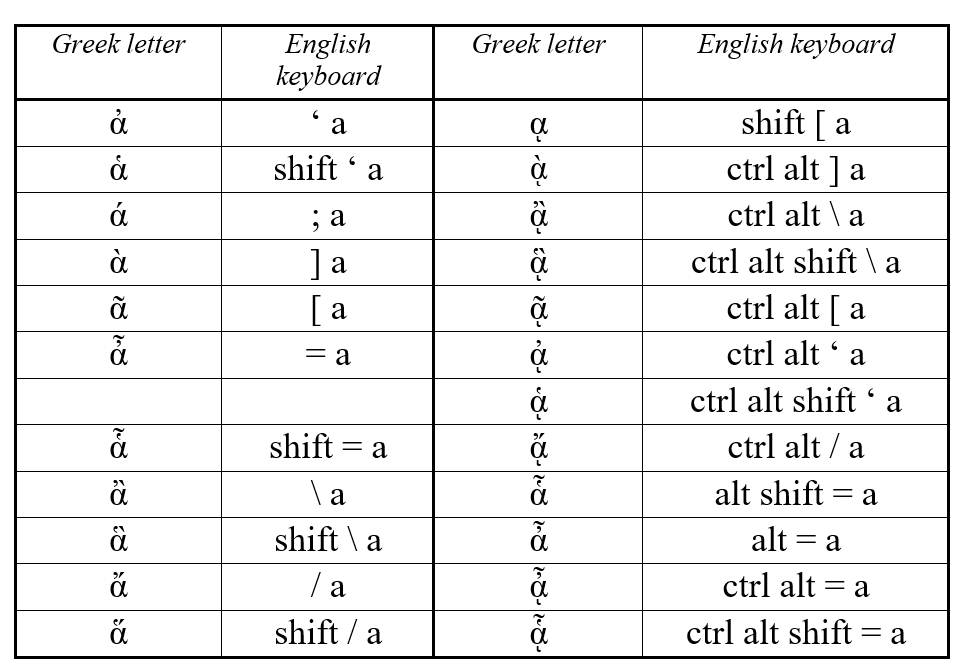
Breathing marks and accent marks are typed using specific key combinations. These combinations are provided in the table below.
The installation instructions above are based on the Windows 10 operating system. Please note that the process may be slightly different on other operating systems.
To switch to Greek while typing, look for the language selection option on your screen (usually located in the bottom-right corner of the taskbar) and select Greek.
The layout of Greek letters on the Unicode keyboard is shown in the image below. Punctuation marks are the same as on the standard English keyboard.
Breathing marks and accent marks are typed using specific key combinations. These combinations are provided in the table below.